

BleeqUp - Bluetooth Controller
BleeqUp - Bluetooth Controller
Low stock
Couldn't load pickup availability
- 3 años de garantía
- 14 días de devolución
- 100% pago seguro
| Brand | BleeqUp - SKU: A00004701 - EAN: 6976745170046 |
| Shipping | International shipping. Free from €100 in the Iberian Peninsula. Outside the EU, customs and local taxes are the responsibility of the customer. |
| Financing |
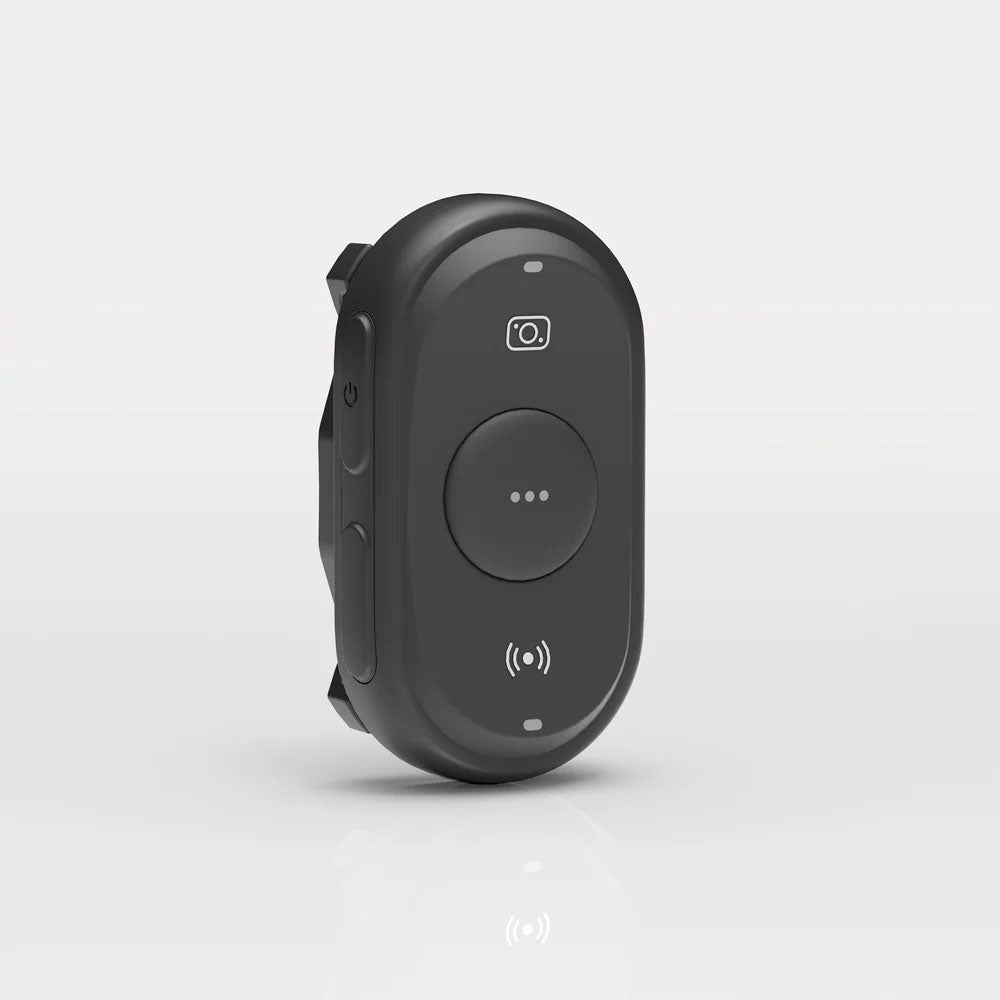
Bluetooth Controller for Smart Glasses – Multifunctional and Handlebar Mount
Complete control at your fingertips. The BleeqUp Bluetooth Controller lets you manage your smart glasses and connected devices conveniently and efficiently. Ideal for cyclists and tech enthusiasts, it features photo capture, video recording, music control, and call handling. Its compact design and easy handlebar mounting make it the perfect accessory for your adventures.
Main Features
- Fast and stable Bluetooth connection.
- Multifunction buttons: photo capture, video recording, music control and calls.
- Secure mounting on the handlebar with rubber bands and Velcro.
- LED indicators for battery, status and recording.
- Compatible with multiple models of smart glasses.
- Automatic shut-off if not connected for 2 minutes to save battery.
Package Contents
- Bluetooth Controller
- Silicone strap with buckle
- Velcro strip
- Mounting rubbers (large and small)
- Button cell battery included
Design and Appearance
Front: Capture button, recording LED indicator, mute button, and status LED.
Left side: Volume and power buttons.
Back: Silicone buckle, hole for velcro strap and battery cover.
How to Install the Button Cell Battery
-
Use a coin to turn the battery cover counterclockwise.
-
Insert the battery with the spring side first.
-
Close the lid and turn it clockwise with the coin until it is secure.
Bluetooth pairing
-
Make sure the glasses are connected to the app and have Bluetooth enabled.
-
Press any button on the controller to turn it on (green LED flashing).
-
Put the glasses into pairing mode by holding down both buttons on the arms for 5 seconds (blue LED flashing).
-
Put the controller into pairing mode by holding down the power and mute buttons for 5 seconds (green LED flashing).
-
Successful connection will be confirmed by a voice prompt from the glasses and an indicator LED.
Button Functions and LED Indicators
- Power On/Off: Press and hold for 5 seconds to turn off (red LED), press once to turn on (green LED).
- Capture button: Short press for photo; long press for recording.
- Mute button: Mute your intercom or all users depending on the duration of the press.
- Music buttons: Play/pause, next or previous track with single or multiple presses.
- Volume buttons: Increase or decrease the volume with single presses.
Handlebar Mounting
-
Place the gasket on the back of the controller.
-
Select the appropriate rubber band according to the thickness of the handlebar.
-
Use the rubber band and Velcro to secure the controller.
-
Check that it is secure and does not move during use.
Automatic Reconnection
- The controller automatically reconnects to the glasses when switched on before the next use.
- A 3-second green LED confirms reconnection.